BIR Form 1902 for New Employees and Alien Workers
BIR Form 1902 is the registration form you use to get a TIN and register with the Bureau of Internal Revenue as a new employee in the Philippines. If you are starting your first job and do not have a TIN yet, this is the form that officially registers you as a taxpayer under purely compensated income.
Filing this form is required before you start work or, at the latest, within 10 days of your first day of employment.
What is BIR Form 1902?
BIR Form 1902 is officially called the Application for Registration for Individuals Earning Purely Compensation Income (Local and Alien Employee).
It is used exclusively by employees who earn income only from a salary or wages paid by an employer. It is not for freelancers, self-employed individuals, or business owners. If you earn purely from employment and need a TIN, Form 1902 is your starting point.
Who Needs to File BIR Form 1902?
You need to file Form 1902 if you fall under any of these categories.
Note: If you already have a TIN from a previous employer, you do not file Form 1902 again. Give your existing TIN to your new employer and file BIR Form 1905 to update your RDO if you have moved to a new address.
Documents Required for BIR Form 1902
Prepare all documents before submitting. Missing any document causes rejection or delays.
For Local Filipino Employees:
Accepted valid IDs:
For Resident Alien Employees:
For Employees with Declared Dependents:
How to Fill Out BIR Form 1902
Download the latest January 2018 (ENCS) version of BIR Form 1902 from bir.gov.ph. Always use the current version to avoid rejection.
General Filling Rules:
Part I: Taxpayer and Employee Information
Field 1: PhilSys Number (PSN)
Write your PhilSys National ID number here if you have one. Leave blank if you do not have a PhilSys ID yet.
Field 2: Taxpayer Type
Mark the correct box.
Field 3: BIR Registration Date
Leave this blank. The BIR officer fills this in after processing.
Field 4: TIN
Write your TIN here only if you already have an existing one. Leave blank if this is your first TIN application.
Field 5: RDO Code
Leave this blank. The BIR fills this in based on your employer’s address.
Field 6: Taxpayer’s Name
Write your full legal name in this order: Last Name, First Name, Middle Name, Suffix (Jr., Sr., III, etc.). Use exactly the name on your PSA Birth Certificate.
Field 7: Date of Birth
Write in MM/DD/YYYY format. Example: 03/15/1999.
Field 8: Sex
Mark Male or Female as it appears on your PSA Birth Certificate.
Field 9: Citizenship
Write Filipino for Philippine citizens. Foreign nationals write their country of citizenship.
Field 10: Civil Status
Mark your correct civil status: Single, Married, Legally Separated, Widower, or Head of Family. This determines your personal exemption on income tax computations.
Field 11: Contact Number
Write your active mobile number. The BIR may contact you here.
Field 12: Residential Address
Write your complete home address, including barangay, city or municipality, province, and zip code. This determines your assigned RDO.
Field 13: Zip Code
Write the correct postal code for your residential address.
Part II: Spouse Information
Fill in your spouse’s full name and TIN if married and your spouse is also employed. Leave blank if single or if your spouse has no TIN.
Part III: Employer Information
Employer’s Registered Name
Write the exact registered business name of your employer as it appears on their BIR Certificate of Registration.
Employer’s TIN
Write your employer’s TIN. Ask your HR department for this if you do not know it.
Employer’s Address
Write the complete registered address of your employer’s office. This determines which RDO processes your registration.
Relationship Start Date
Write your official start date of employment in MM/DD/YYYY format.
Contact Number
Write your employer’s official contact number.
Part IV: Declaration
Both you as the employee and your employer’s authorized representative must sign the declaration section. If your employer is filing this on your behalf, your employer’s HR officer signs here together with the company’s official stamp.
How to Submit BIR Form 1902
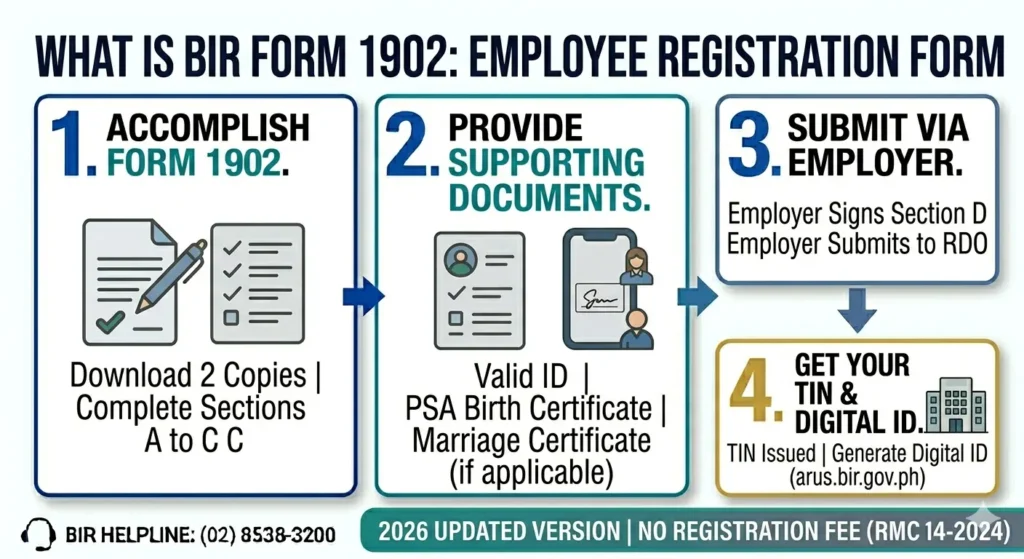
You can submit your Form 1902 to your employer’s HR or Accounting department, File Directly at the RDO, or at orus online.
Employer Files on Your Behalf
Your employer’s HR or Accounting department normally files BIR Form 1902 on your behalf within 10 days from your hire date.
What your HR does:
Always follow up with your HR department after your first week to confirm your Form 1902 was submitted. Ask for a copy of your stamped Form 1902 as proof.
You File Directly at the RDO
If your employer has not filed for you after two weeks, or if you want to register on your own, you can submit Form 1902 directly at your RDO. Steps:
Which RDO to go to? For employees, you submit at the RDO that covers your employer’s address, not your home address. Ask your HR for your employer’s RDO Code.
Online via ORUS
New employees can also register and get a TIN through ORUS at orus.bir.gov.ph.
What Happens After Your Form 1902 is Processed?
After your Form 1902 is approved, here is what you receive and what happens next.
Fees for BIR Form 1902
Fee | Amount |
|---|---|
TIN registration | Free |
Documentary Stamp Tax (ORUS) | PHP 30 |
Annual Registration Fee | Waived (free since RMC 14-2024) |
Walk-in RDO processing | Free |
There is no registration fee for employees filing Form 1902. The only cost involved when registering through ORUS is the PHP 30 Documentary Stamp Tax.
Common Mistakes When Filing BIR Form 1902
Avoid these errors to prevent delays or rejection.
Important Reminders
Keep these rules in mind before and after filing BIR Form 1902.
FAQs
Conclusion
BIR Form 1902 is the first BIR form every new employee in the Philippines needs to file. It registers you as a taxpayer, gets you a permanent TIN, and sets up your income tax withholding with your employer. Your employer typically handles the filing on your behalf within 10 days of your start date, but you can also file it yourself at your RDO or through ORUS online.
The fastest option in 2026 is ORUS at orus.bir.gov.ph, where you can complete your registration online and receive your TIN via email the same day. Once your TIN is issued, generate your free Digital TIN ID through ORUS immediately so you have a valid government ID ready for any bank or government transaction.