
BIR TIN Online Registration via ORUS
Getting a Tax Identification Number (TIN) in the Philippines no longer requires falling in line at a Revenue District Office. The Bureau of Internal Revenue now allows full TIN registration online through ORUS, the Official Online Registration and Update System.
Under the Ease of Doing Business Act (RA 11032), you no longer need to queue at the RDO. The BIR’s ORUS portal lets you register and receive your TIN in roughly 15 minutes.

What is a TIN and Why Do You Need One?
A TIN, or Taxpayer Identification Number, is a unique code issued by the BIR to identify you for all tax-related transactions in the Philippines. For individuals, it is a 9-digit number. For corporations and partnerships, it is a 12-digit number. You need a TIN if you are:
Under Section 236 of the National Internal Revenue Code (NIRC), every Filipino taxpayer is required to have one TIN. Applying for more than one TIN is a violation of Philippine law.
One-TIN Rule — Legal Mandate
Under Section 236(j) of the National Internal Revenue Code, every individual is assigned exactly one TIN for life. Applying for a second TIN—whether intentionally or by accident—carries a penalty of up to PHP 50,000 and possible criminal prosecution.
If you already have a TIN from a previous employer, do not register for a new one. Instead, use BIR Form S1905 to update your existing record with your current Revenue District Office.
Who Can Register for a TIN Online via ORUS?
ORUS covers all individual taxpayer types. Here is a breakdown of who qualifies for each registration category.
Employees
Newly hired employees whose employer will withhold taxes. Your HR department may file on your behalf.
Self-Employed / Freelancers
Sole proprietors, freelancers, and professionals earning income outside of traditional employment.
EO 98 / One-Time Transactions
Individuals who need a TIN solely for one-time government transactions—no business or employment involved.
Mixed Income Earners
Form 1901
Those with both employment income and self-employed or freelance income requiring a combined registration.
Documents Required Before You Register
Prepare your documents before you start. ORUS will ask you to upload them during registration.
Valid IDs accepted by BIR: Passport, PhilSys National ID, driver’s license, UMID, voter’s ID, PRC ID, postal ID, or any other government-issued ID with photo and signature.
How to Register for a TIN Online via ORUS
The process takes 30 minutes to complete and you can get your TIN within 1 business day.
Step 1: Check for Existing Records
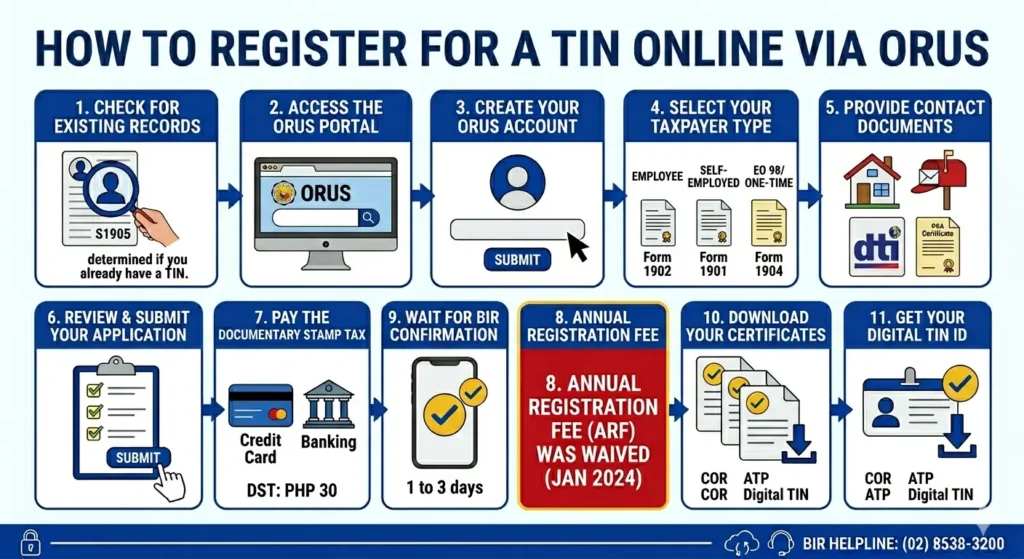
Before anything else, determine if you already have a TIN from a prior employer or transaction. Visit the ORUS portal and run a check. If a record exists, use BIR Form S1905 to update it—do not create a duplicate. New applicants with no prior record can skip directly to Step 2.
Step 2: Access the ORUS Portal
Open your browser and navigate to orus.bir.gov.ph. The system works best on Google Chrome or Microsoft Edge. Ensure you have a stable internet connection before proceeding.
Step 3: Create Your ORUS Account
Click the “New Registration” button on the homepage.
Select your registration type:
Only one email address per taxpayer is allowed in the system.
Step 4: Select Your Taxpayer Type
Choose your registration category: Employee (Form 1902), Self-Employed/Freelancer (Form 1901), or EO 98/One-Time (Form 1904). Mixed-income earners should select Self-Employed.
Step 5: Fill Out Personal Information
Enter your full legal name, date of birth, civil status, and nationality. Use the exact details that appear on your PSA Birth Certificate to avoid validation errors.
Step 6: Provide Contact & Address Details
Input your current residential address and, if applicable, your registered business address. Include zip codes and barangay details. These must match your supporting documents.
Step 7: Upload Required Documents
Scan or photograph your valid ID and PSA Birth Certificate. File formats accepted: JPEG, PNG, or PDF. Maximum file size is typically 5 MB per document. Ensure all text is legible.
Step 8: Review & Submit Your Application
Double-check every field for accuracy. Typographical errors in your name or birthdate can delay processing. Once satisfied, click ‘Submit’ to send your application for BIR validation.
Step 9: Wait for BIR Confirmation
The BIR reviews applications within 1 to 3 business days. You will receive an email notification once your TIN is generated. During peak periods, processing may take slightly longer.
Step 10: Pay the Documentary Stamp Tax
A Documentary Stamp Tax (DST) of PHP 30 is required. Payment can be made through online banking, e-wallets, or credit/debit cards via the ORUS payment gateway. Note: the Annual Registration Fee (ARF) of PHP 500 is WAIVED for new registrants under current BIR guidelines.
PHP 500 ARF is WAIVED. Only PHP 30 DST applies.
Step 11: Download Your Digital TIN ID
Once approved, log back into ORUS and navigate to your dashboard. Your Digital TIN ID will be available for download. This serves as a primary government-issued ID valid for banking, SIM registration, and other official transactions.
How to Get Your Digital TIN ID via ORUS
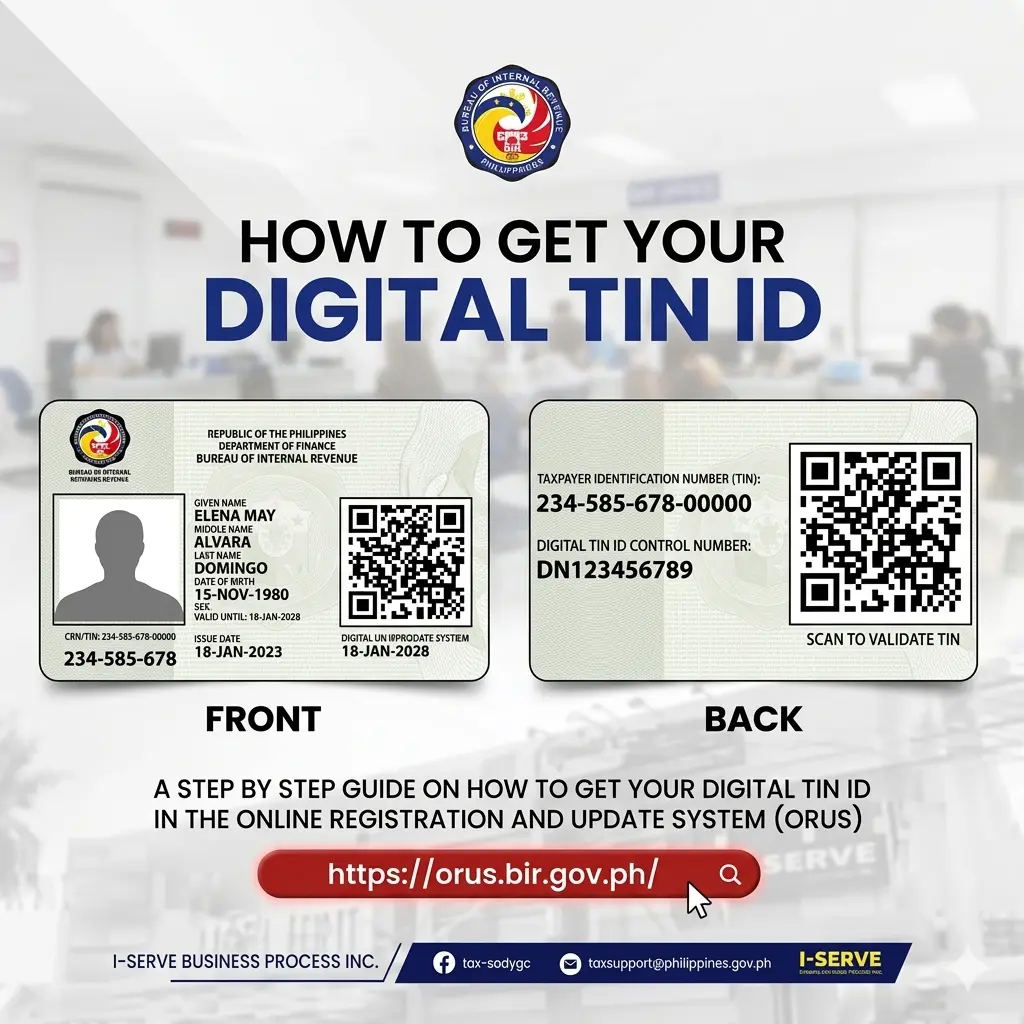
The Digital TIN ID was introduced under RMC No. 121-2023. It is free, issued entirely online, and accepted as a primary government-issued ID in the Philippines.
Here is how to get it after you have an active TIN and ORUS account:
The Digital TIN ID includes your name, TIN number, date of birth, and a QR code. Any employer, bank, or government agency can verify it by scanning the QR code through ORUS.
Your TIN Is Now a Primary Government ID
Under Revenue Memorandum Circular No. 121-2023, the BIR Digital TIN ID is recognized as a valid primary identification document. It carries the same legal weight as a physical ID.
Banking & Financial Transactions
Open bank accounts, apply for loans, and complete KYC verification using your Digital TIN ID.
SIM Card Registration
Compliant with the SIM Registration Act. Present your QR-enabled Digital ID at any telco outlet.
PhilSys Integration
Works alongside your PhilSys National ID (RA 12023) as part of the government’s digital identity ecosystem.
Common Errors and How to Fix Them
Frequently Asked Questions
Conclusion
Getting a BIR TIN number is now faster and more convenient through ORUS. Instead of visiting an RDO, you can complete the entire registration process online in just a few steps. Whether you are a freelancer, employee, or first-time applicant, ORUS makes it easy to apply, submit documents, and receive your TIN within a short time.
With features like the Digital TIN ID, multiple online payment options, and the removal of the Annual Registration Fee, compliance has become more accessible than ever. As the system continues to improve with upcoming updates like a mobile app and automated validation, ORUS is set to make tax registration even more efficient in the future.