BIR Form 1701: Requirements, Tax Regimes, and Step-by-Step Filing
Filing your annual income tax return is one of the most critical statutory responsibilities for self-employed professionals, sole proprietors, and mixed-income earners in the Philippines. Among the Bureau of Internal Revenue’s (BIR) annual returns, BIR Form 1701 is the most comprehensive and complex individual tax return.
Unlike pure compensation earners whose taxes are withheld and consolidated by their employers, individuals with multiple income streams or business activities must consolidate their revenues, deductions, and tax credits on Form 1701.
What is BIR Form 1701?
BIR Form 1701, officially titled the Annual Income Tax Return for Individuals (including Mixed Income Earners), Estates and Trusts, is the annual tax summary submitted by self-employed individuals, professionals, and mixed-income earners to report their annual taxable income, allowable deductions, and tax liabilities for the preceding calendar year.
BIR Form No. 1701 Overview
Official Title: Annual Income Tax Return for Individuals, Estates, and Trusts
Core Functions:
The return summarizes all economic activities conducted from January 1 to December 31 of the taxable year, reconciles the advance quarterly income tax payments made via BIR Form 1701Q, and calculates the final tax balance due to (or refundable from) the government.
Who is Required to File BIR Form 1701?
Under Section 51 of the National Internal Revenue Code (NIRC), as amended, the following individual taxpayers must file BIR Form 1701 regardless of their gross income amount:
Mixed-Income Earners
Receiving salary income alongside business/freelance revenue.
Itemized Filers
Self-employed taxpayers opting for itemized expense deductions.
Estates & Trusts
Entities actively engaged in business or commercial operations.
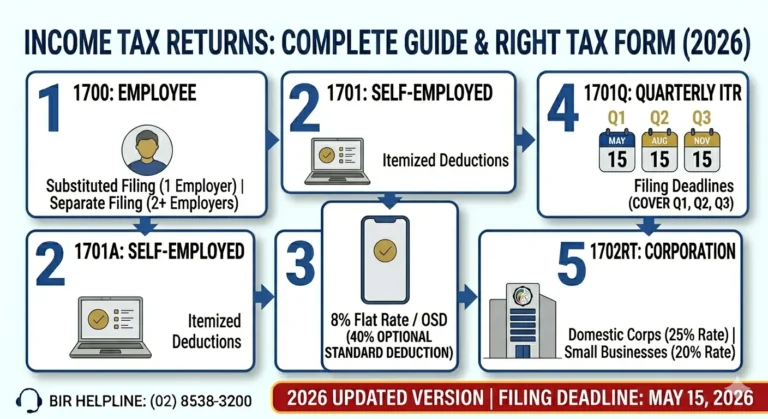
Form 1701 vs. Form 1701A vs. Form 1700: Which Form Should You File?
The BIR provides three distinct annual income tax forms for individual taxpayers. Selecting the correct form depends on your income sources and selected tax rate:
Parameter | BIR Form 1701 | BIR Form 1701A | BIR Form 1700 |
|---|---|---|---|
Target Taxpayer | Mixed-income earners, Estates, Trusts, Itemized filers | Purely self-employed / professionals | Purely compensation earners with multiple employers |
Income Source | Compensation + Business/Profession, or Pure Business | Pure Business / Profession only | Pure Compensation (Salaries, wages) only |
Available Deduction Modes | Itemized Deductions, Special Rates, OSD (for mixed) | 8% Flat Tax Rate OR Graduated Rates with OSD | Not Applicable (Substituted filing exceptions) |
Complexity | High (Multi-page comprehensive return) | Low (Simplified 2-page return) | Moderate (2-page consolidation) |
Mandatory Attachments | AFS (if > ₱3M gross), 2307, 2316, SAWT | 2307, SAWT (No AFS required for 8% filers) | 2316 from all employers during the year |
Key Rule of Thumb: If you received a BIR Form 2316 from an employer AND also have a registered business or freelance practice with a BIR Form 2303, you must file Form 1701. You cannot file Form 1701A.
Tax Regimes Available Under BIR Form 1701
Taxpayers filing Form 1701 calculate their taxes based on how their income is structured:
Tax Regimes Summary
1. Graduated Tax Rates with Itemized Deductions
Deduct ordinary and necessary business expenses with official receipts. Net taxable income is taxed at progressive rates (0% to 35%).
2. Mixed-Income Computation
Compensation portion is always taxed under graduated table rates. Business/Professional portion is taxed either at 8% flat rate (on gross receipts) or graduated rates with deductions.
Graduated Rates with Itemized Deductions
Under this method, you declare gross sales/revenues and deduct substantiated ordinary and necessary business expenses (e.g., office rent, utilities, employee salaries, depreciation, supplies).
The resulting net taxable income is subject to the progressive individual income tax schedule:
Taxable Income Bracket (Annual) | Basic Tax Rate |
|---|---|
₱0 – ₱250,000 | 0% (Tax Exempt) |
₱250,001 – ₱400,000 | 15% of excess over ₱250,000 |
₱400,001 – ₱800,000 | ₱22,500 + 20% of excess over ₱400,000 |
₱800,001 – ₱2,000,000 | ₱102,500 + 25% of excess over ₱800,000 |
₱2,000,001 – ₱8,000,000 | ₱402,500 + 30% of excess over ₱2,000,000 |
Over ₱8,000,000 | ₱2,202,500 + 35% of excess over ₱8,000,000 |
2. Mixed-Income Earner Taxation Rules
If you earn both salary and business income:
Mandatory Documentary Attachments for Form 1701
Filing the electronic form is only half the process. You must submit supporting schedules and certificates to the BIR through the eAFS (Electronic Audited Financial Statements) portal or directly to your Revenue District Office (RDO):
Attachment Checklist
How to File BIR Form 1701 via eBIRForms
Non-eFPS individual taxpayers must prepare and submit their annual returns using the official Offline eBIRForms Package.
1. Open Package ➔ 2. Fill Form 1701 ➔ 3. Schedules ➔ 4. Validate & Submit ➔ 5. Pay Balance➔ 6. eAFS Upload
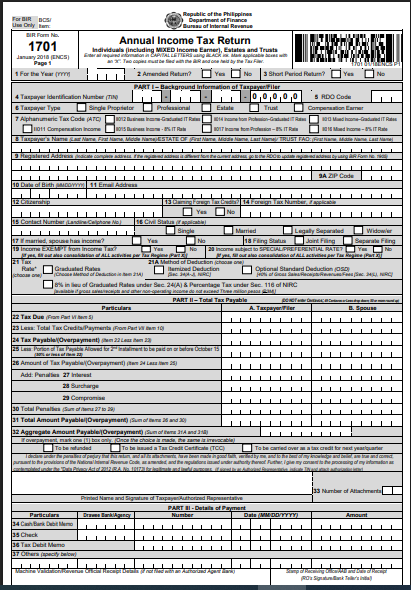
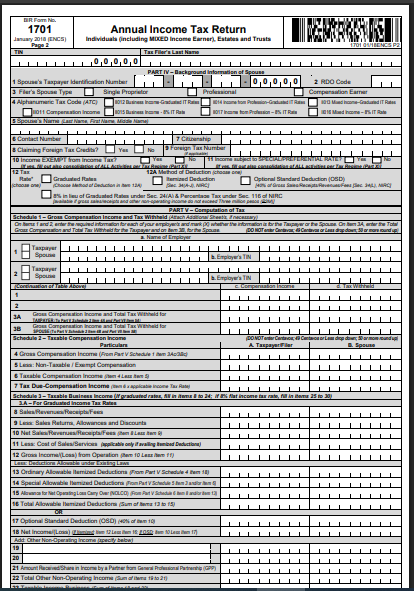
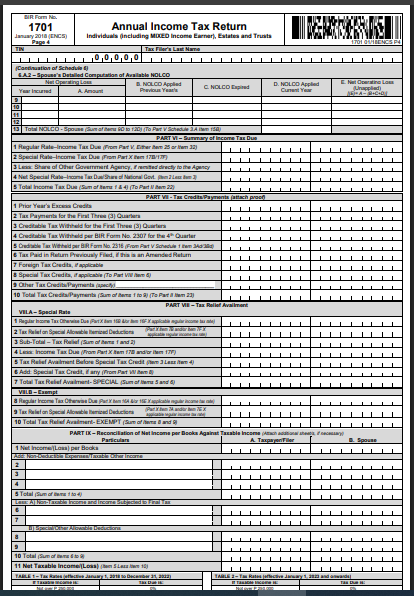
Open the eBIRForms Application
Launch the eBIRForms application on your computer. Enter your 9-digit Taxpayer Identification Number (TIN), RDO code, registered name, line of business, and registered address.
Select BIR Form 1701
From the dropdown list of tax returns, locate and select BIR Form 1701 (Annual Income Tax Return for Individuals, Estates, and Trusts), then click Fill / Open.
Complete Background Information (Part I)
Fill Out the Income and Deduction Schedules
Navigate to the corresponding schedule tabs based on your income profile:
Input Tax Credits and Payments (Part IV-B)
Reconcile your advance tax payments and withholding credits:
Validate, Save, and Submit
How to Pay Your Tax Due (and the 2-Installment Option)
Under the Ease of Paying Taxes (EOPT) Act (RA 11976), taxpayers may pay their tax dues at any Authorized Agent Bank (AAB) or accredited electronic payment gateway nationwide, regardless of RDO territorial jurisdiction.
Payment Gateway | Supported Modes |
|---|---|
LANDBANK Link.BizPortal | ATM, BancNet, LandBank Accounts |
DBP PayTax Online | Visa, Mastercard, JCB Credit/Debit Cards |
Mobile Wallets | GCash, Maya (via BIR Bills Pay section) |
Authorized Agent Banks (AAB) | Over-the-counter Cash or Manager’s Check |
Revenue Collection Officers | In-person RDO cashier payment |
The Two-Installment Payment Option
If your net tax due exceeds ₱2,000, you are legally entitled to pay in two equal installments:
Installment Schedule
Important Filing Deadlines and Late Penalties
Annual Filing Deadline: On or before April 15 of each year covering the preceding taxable calendar year.
Penalties for Late Filing or Non-Filing
Failing to submit your return or pay your taxes on time triggers statutory penalties under Section 248 and 249 of the Tax Code:
Common Mistakes to Avoid When Filing Form 1701
FAQs
Conclusion
Filing BIR Form 1701 accurately and on time is the cornerstone of maintaining clean tax standing for self-employed professionals, sole proprietors, and mixed-income earners across the Philippines. While consolidating multiple revenue streams, itemized deductions, and advance quarterly payments can feel complex, utilizing tools like the Offline eBIRForms package and the eAFS portal significantly simplifies the annual closing process.